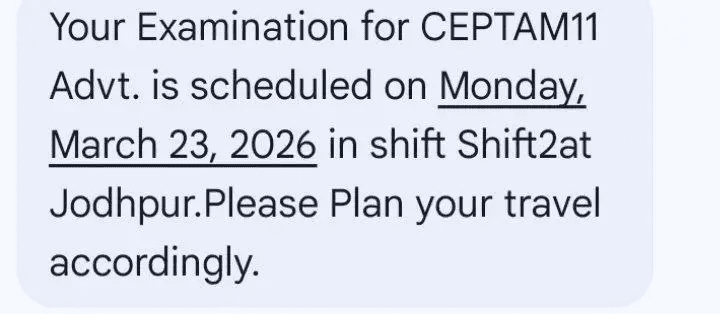
DRDO has sent the DRDO CEPTAM 11 Exam City Intimation Slip on 13th March 2026 to the candidates who will appear for the CBT exam on 23rd March 2026. Candidates can check their exam city and exam date through the SMS or email sent to their registered mobile number and email ID. The DRDO CEPTAM 11 Exam City Intimation Slip was released on 13th March 2026 for the Tier 1 exam. Candidates who applied for the 764 posts of Senior Technical Assistant-B and Technician-A should check their registered email and mobile messages because the details of exam city, shift, and exam date for the exam on 23rd March 2026 are being sent there.
DRDO CEPTAM 11 Exam City Intimation Slip 2026 Out
| Particulars | Details |
| Exam Name | DRDO CEPTAM 11 Tier 1 CBT 2026 |
| Conducting Body | Defence Research and Development Organisation (DRDO) through CEPTAM |
| Post Covered | Senior Technical Assistant-B and Technician A |
| Total Vacancies | 764 |
| City Intimation Release Date | 13th March 2026 |
| DRDO CEPTAM 11 Exam Date | 23rd March 2026 |
| Admit Card | 2-3 days before exam date |
| Selection Process | Tier 1 CBTTier 2 CBTSkill/Trade TestDocument VerificationMedical Examination |
| Official website | www.drdo.gov.in |
Also Read : AIIMS NORCET 10 Recruitment 2026 Out for 2551
DRDO CEPTAM 11 Exam City Intimation 2026 Link
DRDO has sent the exam city or district, exam date, and shift timing details for DRDO CEPTAM 11 through SMS and email. No link has been made available on the official website, so candidates should check the messages on their mobile phone or the email in their mailbox to see their exam details.
How to Check DRDO CEPTAM 11 Exam City Intimation Slip 2026?
From SMS
- Step 1: Open the Messages app on your mobile phone.
- Step 2: Look for an SMS sent by DRDO or CEPTAM. Check both your inbox and promotional folder.
- Step 3: In the message, you will see the name of your exam city.
From E-MAIL
- Step 1: Open your Gmail or email app that you used during registration.
- Step 2: Search for emails from ceptam@drdo.in or type “DRDO” or “Exam City” in the search bar.
- Step 3: Also check the Spam, Promotions, or Updates folder in case the email went there.
- Step 4: Open the email to see the details of your exam city.
What If didn’t received any SMS or Email?
- Check your Spam / Promotional folder in email.
- Make sure you’re checking the correct mobile number and email used during registration.
What After Downloading DRDO CEPTAM 11Exam City Intimation Slips?
- Verify Your Exam Details : Carefully check all the information on the city intimation slip, such as your exam city, exam centre, exam date, and shift timing. Also make sure your personal details like name and registration number are correct.
- Plan Your Travel in Advance : After seeing your exam city, plan your travel and stay early, especially if the exam centre is in another city. Try to book tickets and accommodation in advance to avoid last-minute problems.
- Follow Exam Day Guidelines : Reach the exam centre before the reporting time mentioned in the admit card. Carry only the allowed items inside the exam hall. Mobile phones, electronic devices, and calculators are not allowed.